Release Highlights for Sites
Release Date: December 4, 2026
The 26R3.0 release of most Veeva products for sites is December 4, 2026. Summaries of the major highlights are below for site-facing products as they become available (release timelines vary by product). To view the full release notes for a product, follow the link in the product's section.
Veeva eCOA
Select here to read a full list of what's new in Veeva eCOA this release.
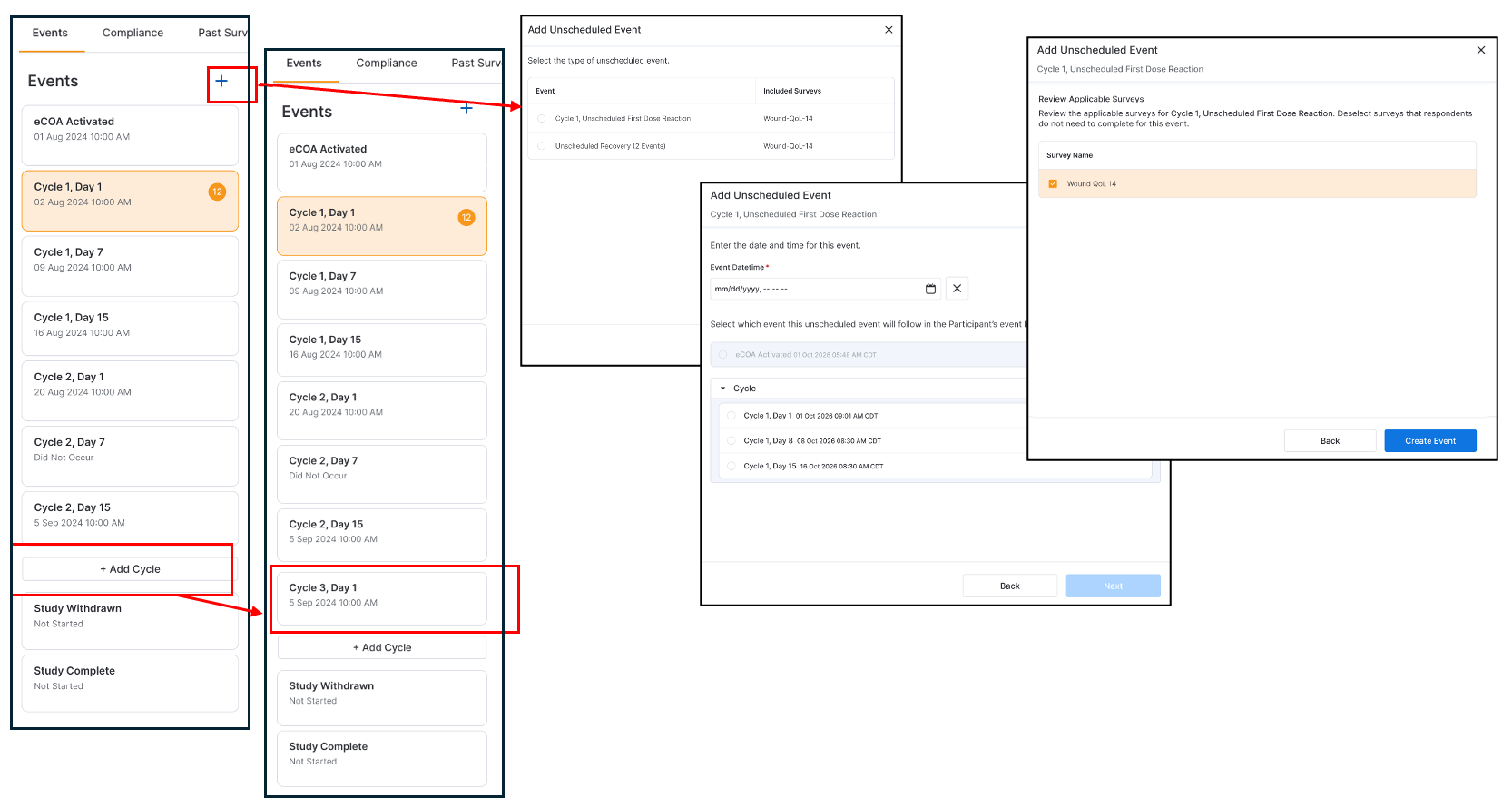
Recurring Event Cycle and Unscheduled Event Addition
For studies with recurring event groups, like cycles, you can now add event group occurrences directly from the Events list using a newly added button. This option becomes available once all events in previous groups have been assigned a date and time or marked as \"Did Not Occur.\" We also updated the workflow for unscheduled events, making it easier to add an unscheduled event or event group to a participant's schedule.
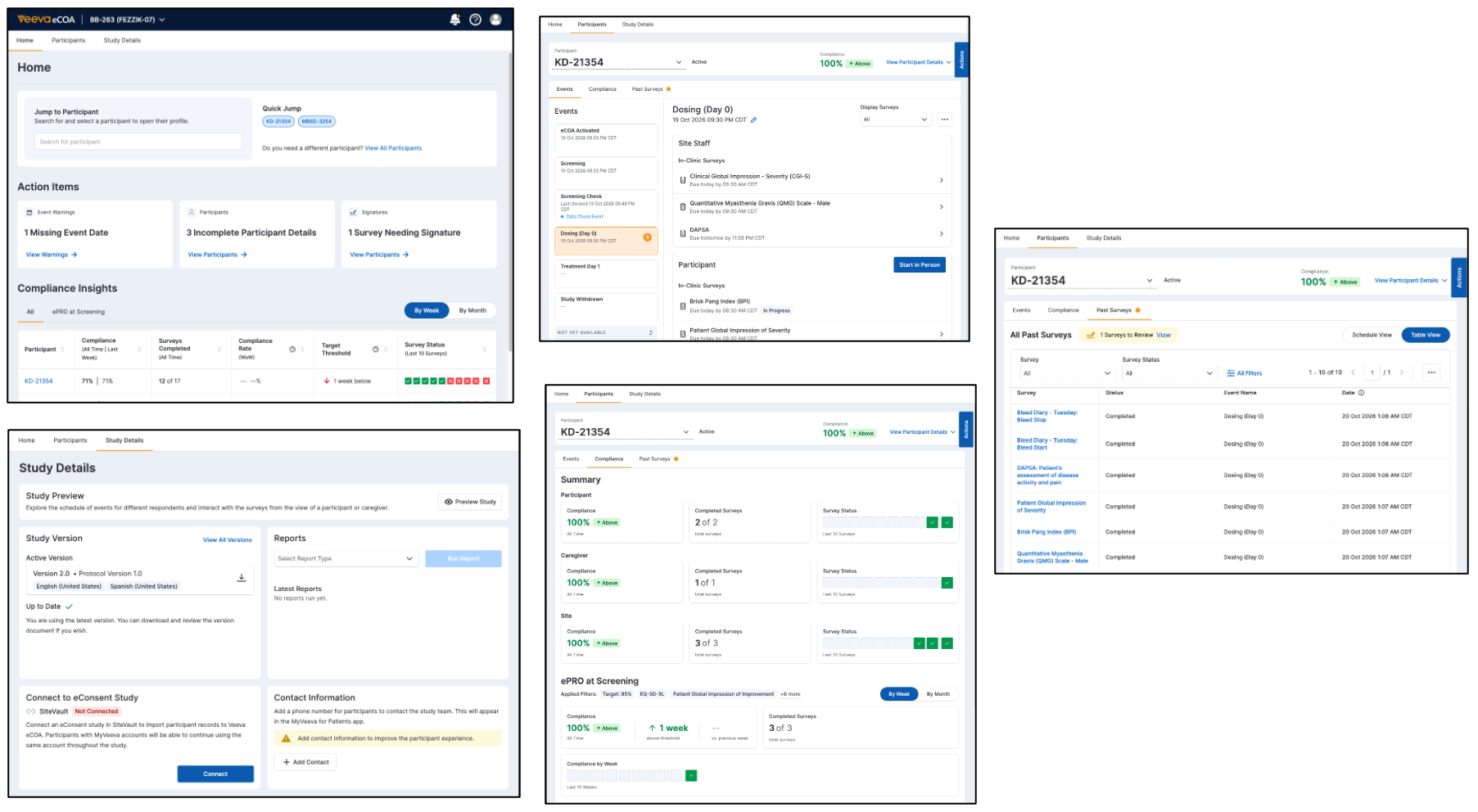
New Landing Page and Improved Participant Management
This feature adds a new Home tab with an improved participant search, quick jump links to participant pages, action items for outstanding tasks, and compliance insights. It also has a redesigned participant page that separates the Past Survey information into its own tab, and has a new tab added for Compliance. The new Compliance tab can help you evaluate participant, caregiver, and site compliance metrics at a glance. You will also see a message on the Study Details page if no site contact information is added.
Participant Event List Updates
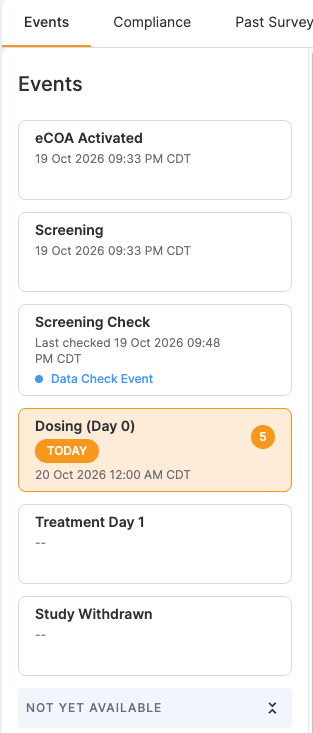
This feature updates the event list on participant pages to include the following:
- The Today heading is removed, and instead a Today label is added next to the events that start on the current day.
- The event list and event details panes scroll independently.
- The events are ordered by their protocol sequence.
- The system will not load the \"Study Withdrawn\" or \"Study Complete\" events as the default event when no date is set.
Session Timeout Extended during Transcriptions and Data Changes
This feature keeps your Veeva eCOA session active while you perform transcriptions and data changes. The system automatically extends the session as you work in the application, and does not time out when you are working on a longer task.
Veeva Site Connect
Select here to read a full list of what's new in Veeva Site Connect this release.
Document Filtering
Users can now filter by Document Type across applicable tabs within the Document Exchange and Payment Information sections of Site Home. This will allow users to quickly narrow down exchanged files using multi-selection as well as search within the filter.
Require Phone Number for IP Addresses
A Phone Number field is now available on Study Site Addresses and is visible to Site users when creating or editing addresses. To ensure contact details are captured upfront and minimize shipment delays, completing this field is now mandatory whenever the Address Type includes IP Shipment.
Site Home Column Header & Action State Updates
When viewing a Form FDA 1572 while not connected to SiteVault, the File to SiteVault button will remain grayed out and display a tooltip reading “To file to SiteVault, use Connect to SiteVault” upon hover. Additionally, the column header in the Payment View grid on Site Home has been updated from Subject to Participant.
Site Home User Interface Improvements
This feature introduces user interface enhancements across Site Home to streamline navigation and improve information visibility for sites:
- Column Layout Optimization: The Sponsor/CRO Comments field has been moved directly to the right of the document name in the Received tabs of both the Document Exchange and Payment Information sections, making contextual notes faster and easier for sites to read.
- Exclusion of Obsolete and Deleted Documents: Document grids across Site Home now fully restrict access or actions from being taken on documents that have been hard-deleted or are associated with an Obsolete or Deleted state type. This update applies across the Document Exchange section, Safety Distribution section, Payment Information section, and End-of-Study Media section.
- Focused View for Study Announcements: When a user logs into Site Connect from an announcement email or clicks an in-app announcement notification link, Vault now opens a focused view displaying only that specific announcement allowing users to immediately review relevant details without distraction. A Show All button is also available to easily return to the full list of announcements.
Veeva SiteVault
Select here to read a full list of what's new in Veeva SiteVault this release.
Create Expense Plans From Chargemaster
Finance site users can now automatically generate study expense plans using standard hospital charge codes, turning hours of manual cost entry into a single process:
- One-Click Expense Plan Generation: After completing the study's Coverage Analysis and linking an active Chargemaster on the Expense Plan's Overview tab, users can select the Draft from Chargemaster action. The system builds the plan within seconds.
- Automatic Itemized Breakdown: If a study activity has multiple charge codes assigned to it, the tool automatically breaks it down into individual line items and applies the exact price from your Chargemaster for each code.
- Smart Code Matching: The action only applies to activities with billing codes assigned in the Coverage Analysis. Non-billable tasks, research-only visits, stipends, and personnel fees are automatically skipped.
- Overwriting Custom Edits: Running this action will overwrite any existing line items or custom cost adjustments previously saved for activities with charge codes.
- Smart Versioning: When you create a new version of an expense plan, your linked Chargemaster automatically carries over as long as it remains active. If the old Chargemaster has been archived, the field will clear so you can select the most up-to-date price list.
NCI Study Registration Wizard
Registering cancer trials for National Cancer Institute (NCI) and Cancer Center Support Grant (CCSG) reporting requires detailed, specialized study information. The new NCI Study Registration Wizard guides site teams step-by-step through collecting, organizing, and validating this complex data directly within SiteVault. This feature is for NCI-designed Cancer Centers and must be enabled by Veeva. If you are interested in enabling this feature please contact SiteVault Support.
- Dedicated NCI / CCSG Tracking Tab: A new NCI / CCSG Info tab on the Study page centralizes all study registration details. An orange indicator dot lets your team know when information is waiting to be completed.
- Flexible, Guided Walkthrough: Selecting Enter Details opens an interactive wizard that walks you through governance, funding sources, and trial attributes. Different team members can complete sections in any order and save progress across multiple sessions.
- Automatic Pre-Filling: The wizard automatically pulls existing information from your study setup—such as research organization details—so you don't have to enter the same data twice.
- Smart Consistency Checks: Built-in logic catches common data entry mistakes and displays clear warning banners without blocking you from saving unique protocol setups.
- Single-Page Summary and Easy Editing: A final summary screen lets you review all entered registration data and active warnings in one view. Once submitted, information can be reviewed or edited at any time directly from the Study tab.
- New General Study Fields: All study records now include standard fields for Study Phase and NCT ID (ClinicalTrials.gov Identifier).
Digital FDA Form 1572
We are excited to introduce a feature designed to streamline the creation of your FDA Form 1572 directly within SiteVault. From the Study eBinder, you can generate a standardized, digital FDA Form 1572 using the information you are already tracking in your SiteVault study.
Key Benefits & Features:
- Automated Data Population: SiteVault automatically pulls in your Principal Investigator, Subinvestigators, partner organizations (Labs and IRBs), and protocol details to populate the document.
- Guided Wizard Experience: A simple, step-by-step wizard allows you to quickly review, verify, and complete all eight sections of the 1572 form before generation.
- Seamless eSignature Routing: Once verified, completing the wizard automatically compiles a PDF copy of the form, files it directly into your study's eBinder, and sends it to your PI for electronic signature.
- Address Management: Site Administrators can conveniently manage and create new addresses for PIs and partner organizations directly within the wizard.
- Compliance: SiteVault’s Digital Form 1572 feature will remain aligned with FDA updates to the Form 1572 versioning.
- Monitor Sharing: Generated 1572s remain fully accessible to monitors and can be seamlessly shared with sponsors via Site Connect.
Task List on SiteVault Home
The default Home tab in SiteVault is enhanced with a filterable list of your tasks and workflows. This upgraded tool makes it easier to organize, find, and complete your daily activities by presenting your work directly within the context of your current site and studies.
Feature Highlights
- Automatic Site and Organization Context: Tasks and workflows now automatically filter to match your currently selected organization or site context.
- Filter by Study and Task Details: You can quickly narrow down your list using top filter dropdowns, including Site, Study, Participant, Visit, and Category.
- Dedicated Task Views: The left navigation panel organizes your work into clear categories:
- All Tasks: Shows every item requiring attention.
- My Tasks: Shows tasks assigned specifically to you.
- Available Tasks: Displays shared tasks (such as monitor feedback) that you or another qualified team member can claim and complete.
- My Workflows: Displays only the workflows that you personally started, making it easier to track documents you sent out.
- Quick Navigation: Selecting either the document name or the Continue button takes you directly to the document viewer to review instructions and complete your task.
- My Active Document Workflows Report: This new report provides a complete, itemized summary of all active workflows you have initiated, showing the full list of participants, due dates, and completion statuses across every assigned task.
Additional Updates
To provide a cleaner and faster experience, several elements from the previous Home page have been updated:
- Unified Page Layout: The option to switch between "Detail" and "Grid" views has been replaced with a single, clean table layout.
- Task Counters: The count numbers in the left menu show your total task counts and stay constant even when you apply table filters.
- Viewing Workflow Progress: Landing page elements like the "Show more / Show less" expandable lists and direct workflow action menus have been removed. To view participant progress or perform actions (such as adding participants or canceling a workflow), click directly into the document and open its workflow details panel.
NOTE: For enterprise organizations using custom document workflows, an additional task configuration step (adding a custom action) is recommended for each workflow task step to ensure full compatibility with the new Tasks functionality.
VeevaID
Select here to read a full list of what's new in VeevaID this release.
VeevaID: Synchronization & Authentication Improvements
This feature introduces real-time identity propagation between VeevaID and connected Vault applications. Previously, Vault applications learned about identity changes reactively, discovering updates only when a user logged into a specific Vault, which caused stale email records.
With this update, when a user’s email address changes in VeevaID, VeevaID propagates the change immediately to all Vaults where the user holds membership. This ensures that your user profiles, audit logs, and system notifications remain fully accurate without waiting for the user to log in again. Additionally, immediate user creation in VeevaID no longer triggers user provisioning in just-in-time Vaults so that your environment avoids accumulating inactive user profiles. Finally, Vault prompts users to complete multi-factor authentication no more than once every seven days. This provides users with a smoother, faster login process while maintaining system security.
Standardizing VeevaID & Vault User Profiles
Prefix, Middle Name, and Suffix standard fields now exist within the VeevaID portal and Vault User object. This enhancement standardizes the identity data model across the Veeva ecosystem.
Previously, users often embedded titles, middle initials, or suffixes directly into the First Name or Last Name fields, which caused operational inefficiencies, disrupted integrations, and complicated electronic signature compliance. By establishing the VeevaID portal as the global source of truth for VeevaID users, this feature ensures that SiteVault user schemas perfectly mirror the VeevaID schema so that your environments maintain unified, compliant, and synchronized identity profiles.
Feature Details
- Standardized System Fields: New system fields added for Prefix (prefix__sys), Middle Name (middle_name__sys), and Suffix (suffix__sys) across the identity layers.
- Enhanced Person and Prior Person Objects: The Person and Prior Person objects now capture the new standard system fields. Standardizing the Person object ensures that business-level records, such as Clinical Study Teams, use the exact same name components as authentication records. These new fields are also updated during the User-Person sync.
- Expanded Character Limits: The Mobile field character limit on the User, Person, and Prior Person objects has increased from 20 to 40, and the Email field character limit has increased from 120 to 128.
- Seamless Authentication Sync: During login, the active session security token now carries the new standard system field attributes, automatically updating the local SiteVault record to match the global identity.
- Preserved Integrations: System fields will handle the automated platform synchronization. Existing application fields are preserved so that downstream applications and integrations do not break.
- Admin Consideration: We recommend using the VeevaID Portal as the exclusive interface for managing user identity changes to prevent automated synchronization issues and mismatched identity states.
VeevaID: Upgraded Anti-bot Protection
VeevaID now features Friendly Captcha, an upgraded privacy-first anti-bot protection layer, alongside an improved user experience and updated cookie consent management.
Previously, VeevaID account registrations and password resets relied on traditional verification systems, which often created form friction and data privacy concerns. VeevaID now replaces legacy CAPTCHA tools with a background cryptographic mechanism. Verification runs silently in the browser so that users experience a seamless and secure authentication process without compromising security.
Both users and Admins will see benefits of this update across many key areas of the VeevaID portal:
- Invisible Anti-Bot Protection: Friendly Captcha automatically secures account registrations and password resets in the background without requiring user input.
- Enhanced Privacy Compliance: The verification process operates without tracking cookies and maintains European Union data residency to align with General Data Protection Regulation (GDPR) standards.
- Standardized Registration Fields: The account creation form now features dedicated fields and dropdowns for Prefix, First Name, Middle Name, Last Name, and Suffix to ensure consistent name data across systems.
- Terms of Service Acknowledgment: The VeevaID registration screen includes an explicit agreement checkbox for updated Terms of Service and Privacy Policies, capturing an audit record upon account creation.
No release notes match the selected filters.