Create and Complete Form 1572
The FDA Form 1572 Generation feature in Site Connect is designed to simplify the process of completing this essential document. Instead of manually typing repetitive information for every study, Site Connect uses data already stored in the system—such as site addresses and staff lists—to automatically fill out many parts of the form for you.
How to Complete the Form
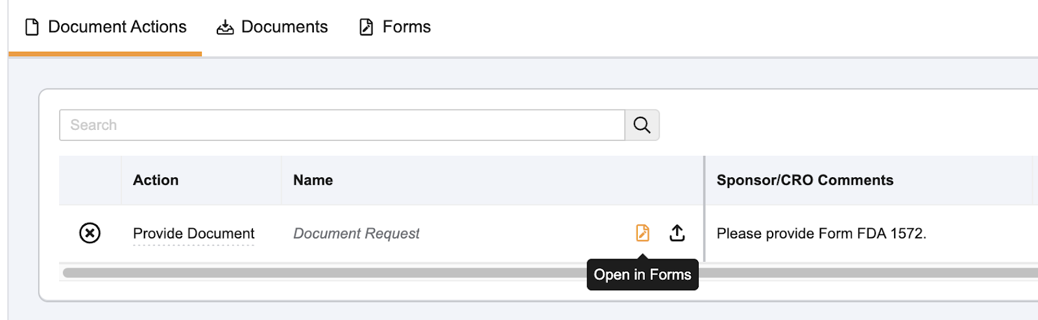
When a Sponsor or CRO requests a 1572, you can generate one on the Forms tab.
- Navigate to the Document Exchange tab.
- Locate the Provide Document task for Form FDA 1572.
- Select Open in Forms or select Forms.
- Review the auto-populated information in the digital form. Site Connect pulls data for:
- Section 1: Principal Investigator name and address.
- Section 3, 4, & 5: Clinical trial locations, labs, and IRB information.
- Section 6: Sub-investigators currently assigned to the study.
- Section 7 & 8: Protocol title, number, and phase.
- If information is missing or needs updating, click into the specific field to edit.
- Note: If removed, addresses are updated to Inactive. Removing staff will automatically trigger a Site Staff Change Request (SSCR) to the sponsor to ensure your site records remain accurate.
- Complete any remaining required fields.
- Once finished, select a submission method:
- Send for eSignature: Routes the form to the Principal Investigator for an electronic signature within Site Connect.
- Download: Generates a fillable PDF for manual “wet ink” signatures. You must then upload the signed copy back to the task.
- File to SiteVault: (If connected) Sends the document directly to your SiteVault for filing and signature.
Things to Know About the 1572 Feature
- PI Signature Requirements: Only the user assigned to the Principal Investigator role in Site Connect can apply an electronic signature to the form.
- Immediate Updates: You do not need to wait for a sponsor to approve an SSCR to finish the form. When you add a new staff member or address while completing the 1572, the form updates immediately so you can proceed with the submission.
- eSignature Page: When signed electronically in Site Connect, a signature manifest (confirmation page) is added to the end of the PDF. The signature blocks on the first page of the form itself will appear blank; this is expected behavior for digital signatures.
- Expired Forms: Site Connect automatically updates the 1572 template when the FDA releases a new version, ensuring you are always using the most current form.
- Non-US Sites: Even if your site is located outside of the United States, your sponsor may still require you to complete this form if the study is conducted under an Investigational New Drug (IND) application.
