- Administrators
Permissions: Site staff with the Study Administration extended permission can manage delegations and team assignments, however to generate the Delegation Log, they must also have the Study Document Management extended permission.
At any time, you can generate the Delegation of Authority (DoA) document. You can return to the Delegations Editor to adjust delegations as many times as needed, then generate the log again. The delegations will only be sent for acceptance or approval when you initiate the action. The document will automatically update to the Current state when the PI approves the document and applies their eSignature.
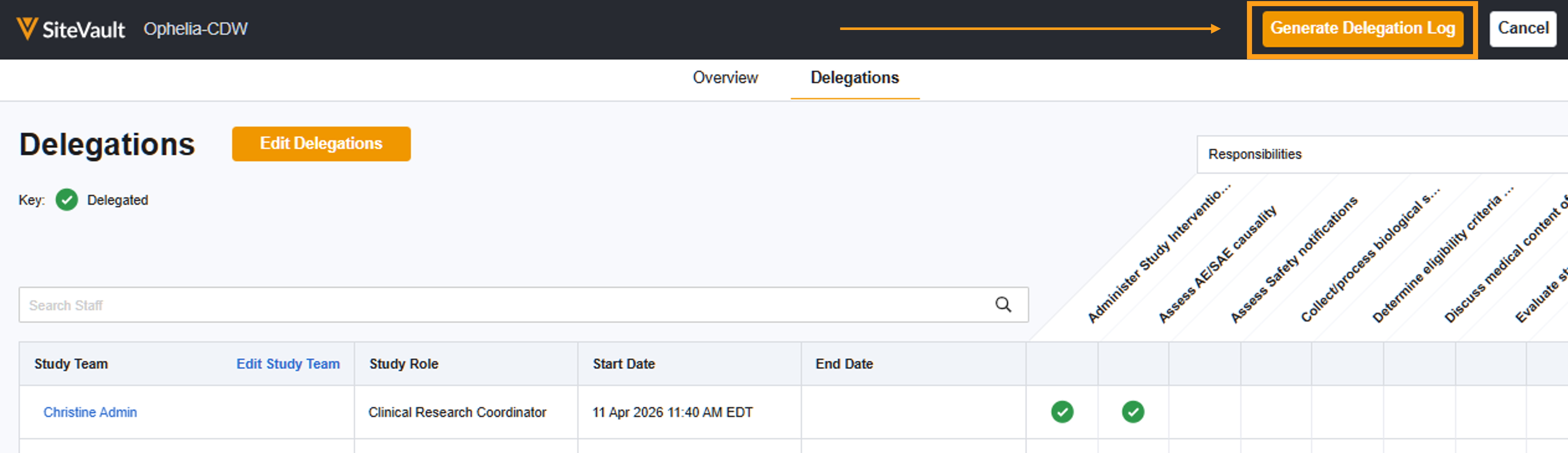
Generate the Delegation Log
To generate a new log:
- Any previous versions in an active workflow for staff acceptance and/or PI approval must be completed or canceled.
- The initiator must access the study in the site context (select the site in the Vault Selector).
- Complete the steps below.
- Access Studies.
- Select a study.
- Select Manage Delegations.
- Select Generate Delegation Log. You will be redirected to the document as it’s generated. If your browser blocks popups, navigate to the document.
- Review the document. The Table of Contents is linked for easy navigation.
- Optionally, return to the Delegations Editor to review and adjust. You can generate the document as many times as required.
- When ready, you can use the document’s Workflow Menu to select one of the following:
- Send for a Review
- Send for PI Approval
- Send for (Staff) Acceptance and PI approval
Staff Acceptance Dates are not included on the Delegation of Authority. Once the log is generated, you can view these via the Audit Trail (All Actions menu) or the document Timeline View (clock icon in right panel). You can also export the acceptance history by exporting the Workflow History Report (All Actions menu).
