When users upload (and classify) documents to the Study eBinder or classify unclassified existing documents in the Study eBinder, the system automatically checks existing documents for a match to reduce the likelihood of uploading duplicate files into your eISF. This also ensures a more aligned versioning process across all of your users.
- Checks occur only when a user uploads (and classifies) a document to the Study eBinder or classifies an unclassified existing document in the Study eBinder.
- Checks do not occur when creating a document in the Library.
- Checks do not occur when uploading an unclassified document to the Study eBinder Document Inbox.
- Checks do not occur on the following Site Document document types: Policy Memo, Standard Operating Procedures, Work Instructions.
There are two types of duplicate checks: Duplicate File check and Duplicate Document Type check.

Duplicate File Check
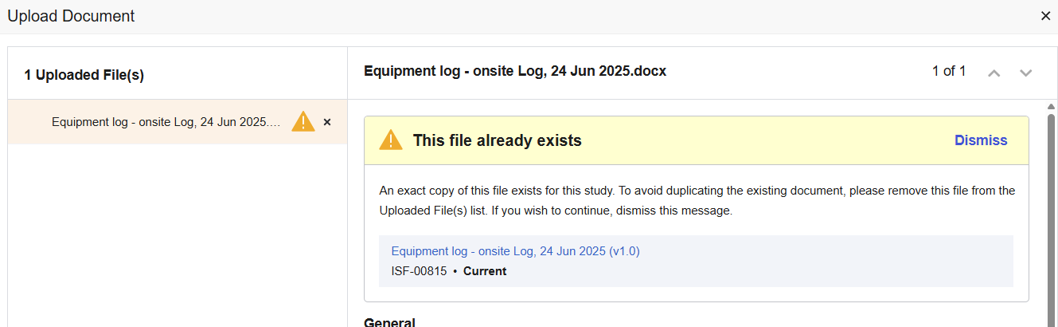
SiteVault will check if the source file being uploaded is an exact match to an existing document’s source file. If a match is found, you are presented with an alert advising you of the match and the option to cancel or proceed with the upload. This check occurs on all eISF document types.
Duplicate Document Type Check
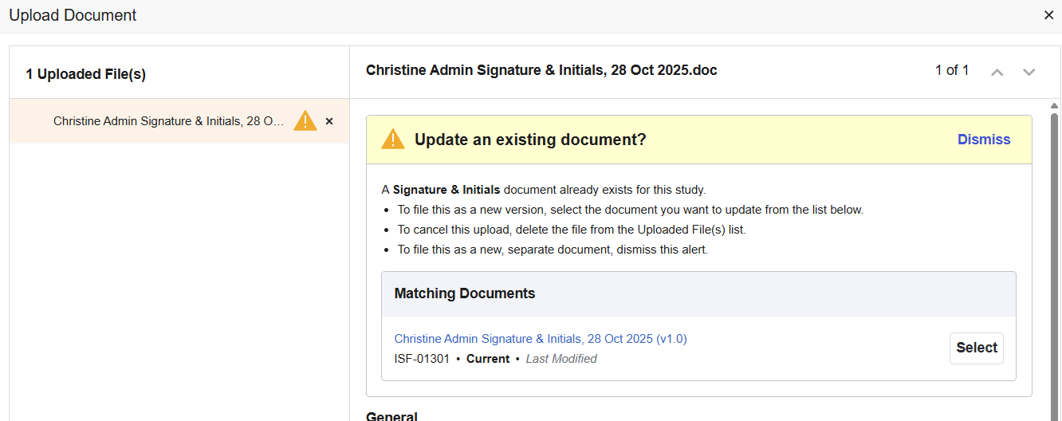
SiteVault will check if the user-populated document fields (or metadata) match an existing document. If a match is found, you are presented with an alert advising you of the match and the option to upversion the existing document, cancel the upload of the document, or upload as a new, separate document. This check occurs only on specific document types (see below).
Documents enabled with Duplicate Document Type Check
- 1572 or Equivalent
- CV
- Delegation of Authority
- Informed Consent Form (blank)
- Investigator Brochure
- IRB/IEC Compliance
- IRB/IEC Composition
- Lab Certification
- Monitoring Visit Log
- Medical License
- Participant Enrollment Log
- Protocol
- Signature & Initials
- Training Evidence (non-study specific)



