Who can complete this task?
- Administrators and Site Staff with the Study Schedule Design & Management Extended Permission
Overview
Once your visit groups are defined, add the individual visits that make up each phase as described in the study protocol.
Add Visits to Visit Groups/Phases
To add visits to your schedule, complete the steps below:
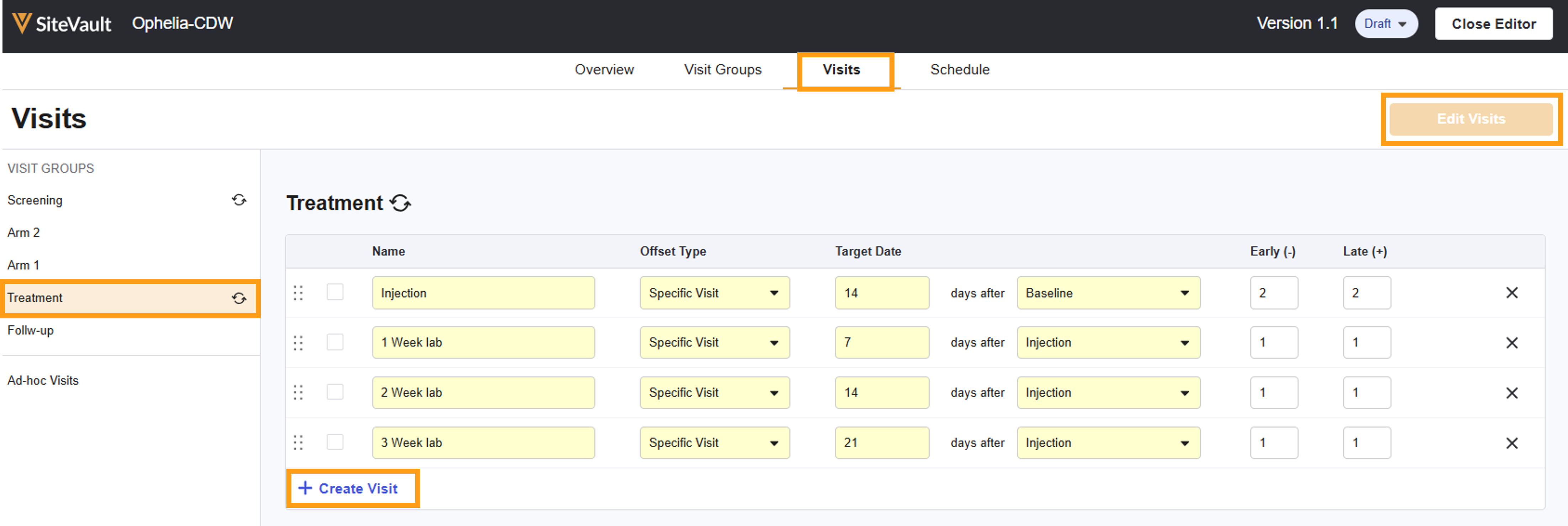
- Within the Schedule Editor, navigate to the Visits tab. Your defined groups/phases are listed on the left.
- Select Edit Visits to add to or modify the visits in a group.
- Select + Create Visit (or press Enter after tabbing to link) to add a new row/visit to the table.
- Complete each visit’s details:
- Name: Enter the name of the visit (ex.,Screening Visit, Baseline, Cycle 1 Day 8).
- Offset Type: Defines how or if this visit relates to other visits:
- None: Visits that can be scheduled independently. Generally, this offset type is recommended for the first visit in a phase.
- Previous Visit: The visit is scheduled relative to the visit immediately preceding it in the sequence, making the previous visit the anchoring visit. This is particularly useful when different branches converge and the exact preceding visit might vary.
- Specific Visit: The visit is scheduled relative to a specific, selected visit anywhere earlier in the schedule (ex., Day 1 of Treatment), making this selected specific visit the anchoring visit. For visits with specific timing relationships, Specific Visit offsets are preferred to Previous Visit.
- Target Date and Anchor Visit: Defines the required timing for the appointment to occur relative to the specific (or previous) visit selected as the anchoring visit.
- Early/Late: These fields define the allowable window (in days, plus or minus) around the target date. For example, if a visit is targeted for 14 days after a specific visit, but can occur between 4 days before or after the target date, you would set Early to -4, and Late to +4.
- Best Practice for Timing: CTMS uses days for precise scheduling. While protocols may state weeks or months, it’s recommended to convert these to days to avoid assumptions (ex., 7-day weeks, 30-day months) that can lead to inaccuracies.
- When you have followed these steps for each visit in each group, Select Save.
- Note: You can move a visit to a different group by selecting the related checkmark and selecting the Move to button.
Ad Hoc Visits
CTMS automatically includes three default ad hoc visit types that cannot be removed:
- Unscheduled Visits
- Adverse Events
- Early Term.
Use the steps above to add customized ad hoc visits to your schedule.
