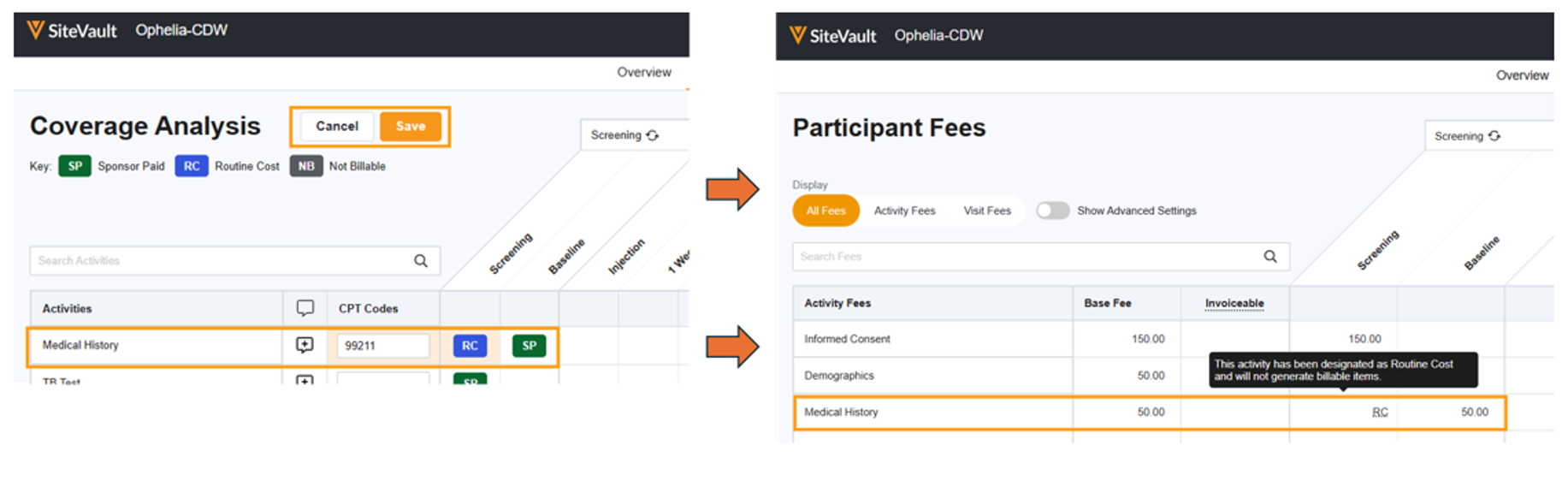
Who can complete this task?
- Administrators and Site Staff with the Financial Management Extended Permission
When enabled on the Budget Overview, the Coverage Analysis tool allows users to precisely define billing responsibilities for each study activity as either Sponsor Paid, Routine Cost, or Not Billable on the Coverage Analysis tab. The tab also provides a space to capture activity-specific billing notes and Current Procedural Terminology (CPT) codes. Once designations and notes are saved, the system uses this information to update the Participant Fees table so that items designated as Routine Cost or Not Billable are not billed to the sponsor.
Enable Coverage Analysis
- Access Study Budget > Overview.
- Select Edit.
- Turn on the Include Coverage Analysis switch.
- Select Save.
Define Billing Responsibilities
Define billing responsibilities as either Sponsor Paid, Routine Cost, or Not Billable.
- Access Study Budget > Coverage Analysis.
- Select Edit Billing.
- Assign a CPT code for each activity, as appropriate.
- For each cell with a responsibility assigned, select the cell and cycle through the options until the correct assignment is displayed.
- Review your assignments.
- Select Save.