Who can complete this task?
- Administrators and Site Staff with the Financial Management Extended Permission
Overview
Site fees are ad hoc or fixed costs you’ve incurred that are not directly tied to participant activities, but are billable to the sponsor (ex., startup fees, annual technology fees, re-consenting fees, administrative costs).
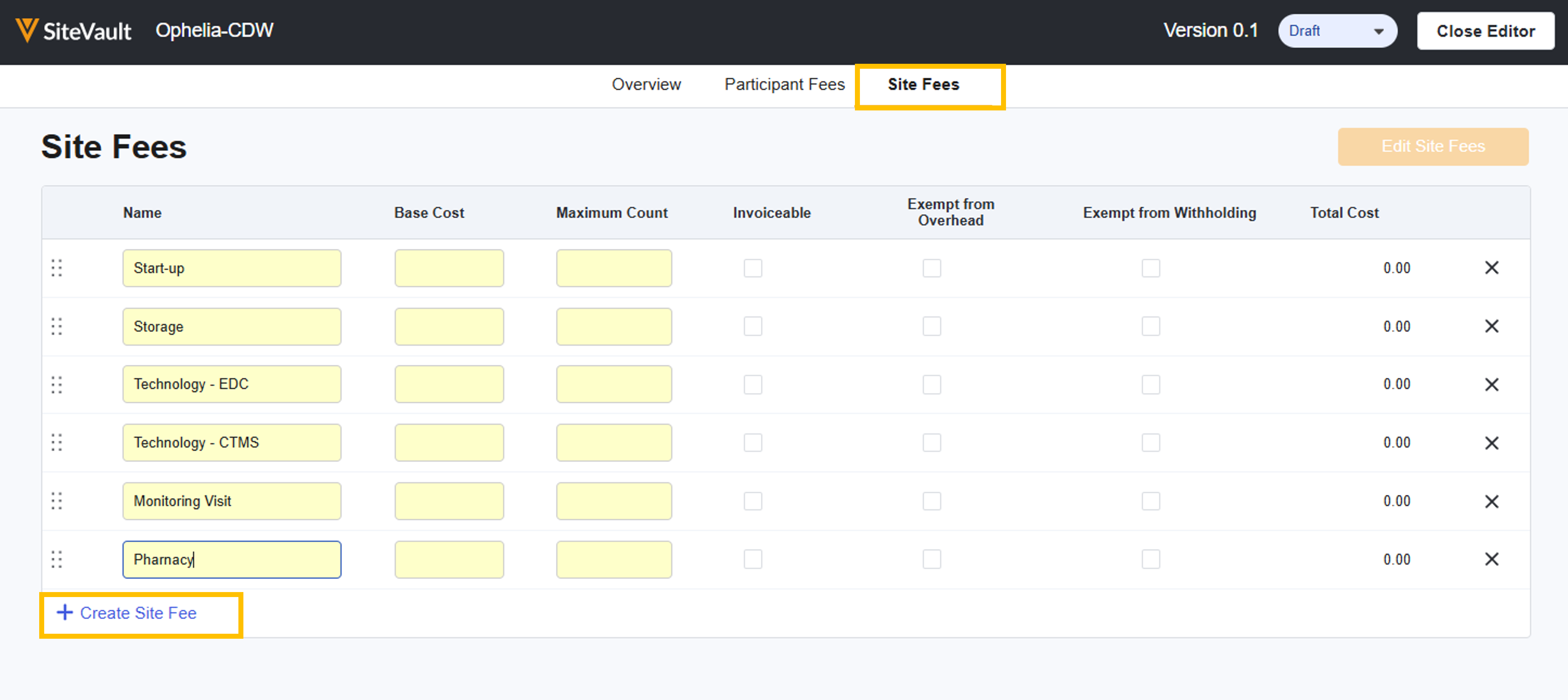
Add Site Fees
To add site fees to your budget, complete the steps below:
- From within the study budget, navigate to Site Fees.
- Select Edit Site Fees.
- Select + Create Site Fee.
- Enter a name for the fee.
- Enter the Base Cost.
- Specify the Maximum Count, which is the maximum number of times you can invoice for this fee over the course of the study.
- Note: For fees without an obvious maximum (such as Monitor Change fees), enter an amount that is sufficiently high to account for the length of the study. The maximum count can always be modified upward in a new draft of the budget.
- Indicate whether the fee is
- Invoiceable
- Exempt from Withholding - Site fees default to exempt, but can be edited
- Exempt from Overhead - Site fees default to exempt, but can be edited
- Repeat the steps above to create additional site fees.
- Optionally, arrange the fees by dragging fees to the preferred order.
- Select Save.



