The responsibilities assigned to your account in Site Connect determine whether you are enrolled to receive safety notifications and how you are permitted to acknowledge safety distributions.
Checking Your Safety Responsibilities
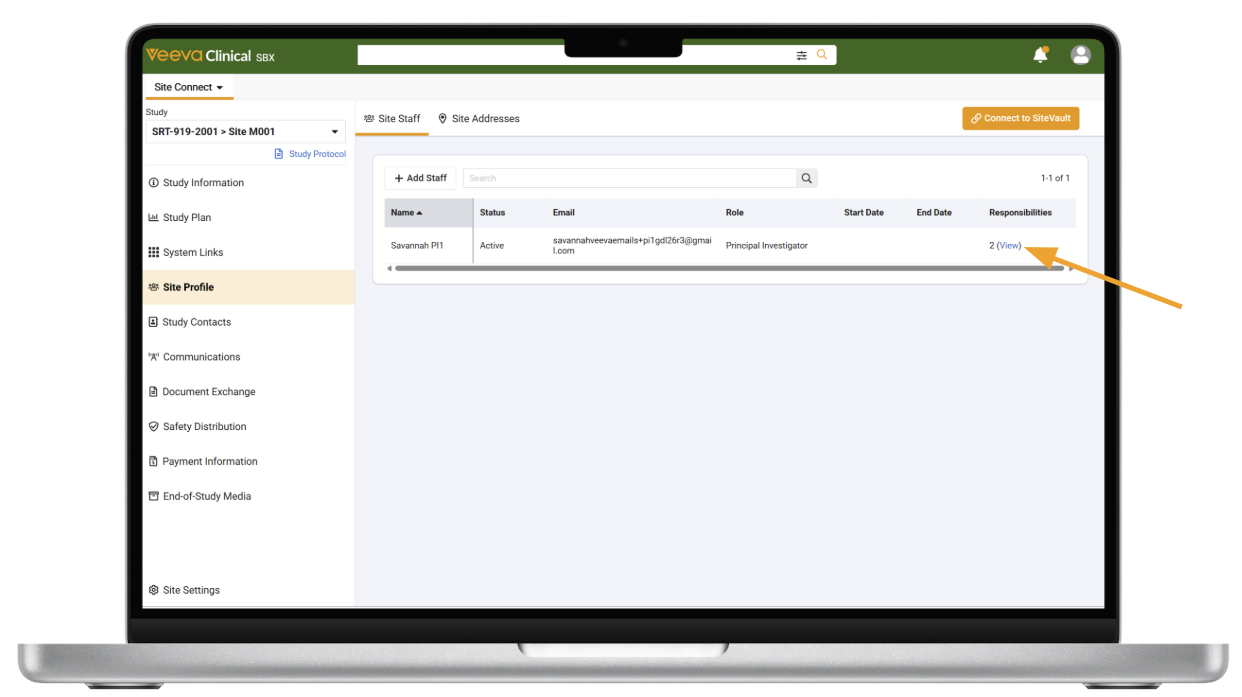
To see if your user is set up to receive safety email notifications and manage safety distributions for a specific study, you (or a colleague with system access) can check your site responsibilities in the system:
- Log into Site Connect (or ask a team member with system access to log in on your behalf).
- Ensure you are on the applicable study.
- Go to Site Profile in the left navigation menu.
- On the Site Staff tab, locate your name in the list.
- Select View under the Responsibilities column.
- Check if Assess Safety Notifications is listed. If the End Date icon appears, it means you once were set up with this responsibility but are not anymore.
Primary vs. Secondary Safety Recipients
If you have the Assess Safety Notifications responsibility, your responsibility will be classified as either Primary or Secondary:
- Primary Safety Recipient: Has full authority to review, acknowledge, and manage safety distributions across all views and email notifications.
- Secondary Safety Recipient: Can review safety documents and acknowledge them directly within the Site Connect system by selecting Mark as Read. However, opening document links within email notifications will NOT automatically mark the documents as acknowledged. Secondary users must log in to Site Connect to complete formal acknowledgment.
