From Site Profile > Site Staff, site users can review and update information for other site staff users.
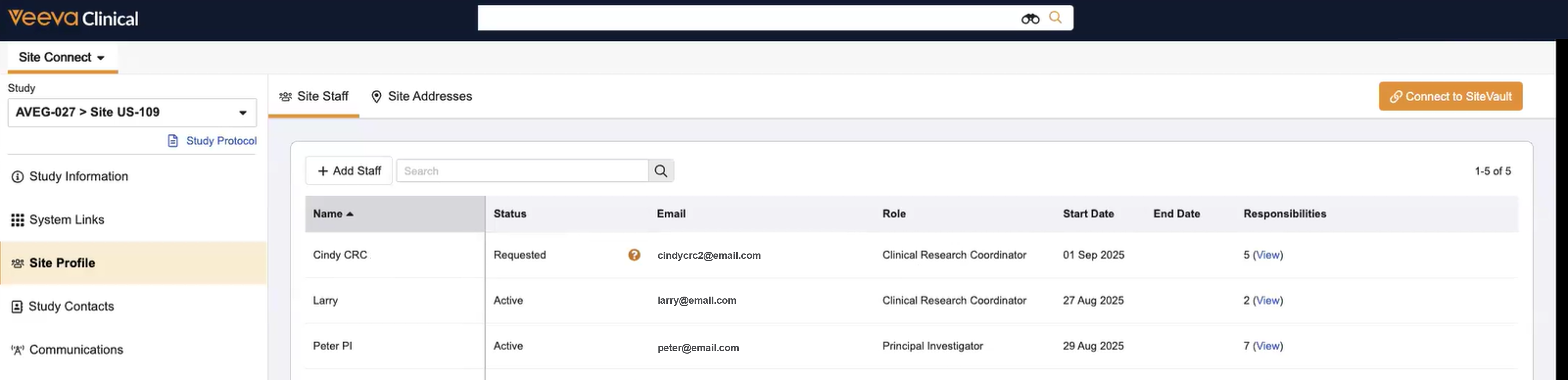
| Term | Description |
|---|---|
| Search Bar | You can search terms from any column of data within the table. |
| Action Menu | Hover and select the Actions menu (...) to the right of the user name. Options are dependent upon the current status. |
| Status | Reflects the status of the most-recent request to add or change the site staff record. This status updates in real time as the sponsor/CRO manages site staff requests. |
| Status Icons |
Hover over status icons for more request specifics and possible actions.
|
| The site staff user's email address. | |
| Role | The role the user was assigned for this study. |
| Start Date | The date study access begins for the site staff user. |
| End Date | The date study access ends for the site staff user. |
| Responsibilities | The number of study responsibilities associated with the site staff user. Select the link to view the list of responsibilities, and if applicable, the dates responsibilities end. |
From the Site Staff list, you can complete the following actions:



