- Navigate to the Subjects page.
-
The Next Event and Target Date column will display the data in a series of colors depending on whether the target date is within window or approaching out of window. The colors are as follows:
- Black: The Subject is not within window for the Next Event. The visit cannot be recorded if there is a hard Enforce Start.
- Red: The visit is now out of window. If the window has a hard Enforce End, then the Site user cannot record the visit and will need to reach out to the Help Desk for further assistance.
- Yellow: The Subject is past due of the target date, but still within window to record the next event.
- Green: The Subject is within window and the target date has not yet passed.
Note: If the Enforce Start and/or Enforce End windows are Soft, the system may still allow the visit to proceed depending on the study settings.
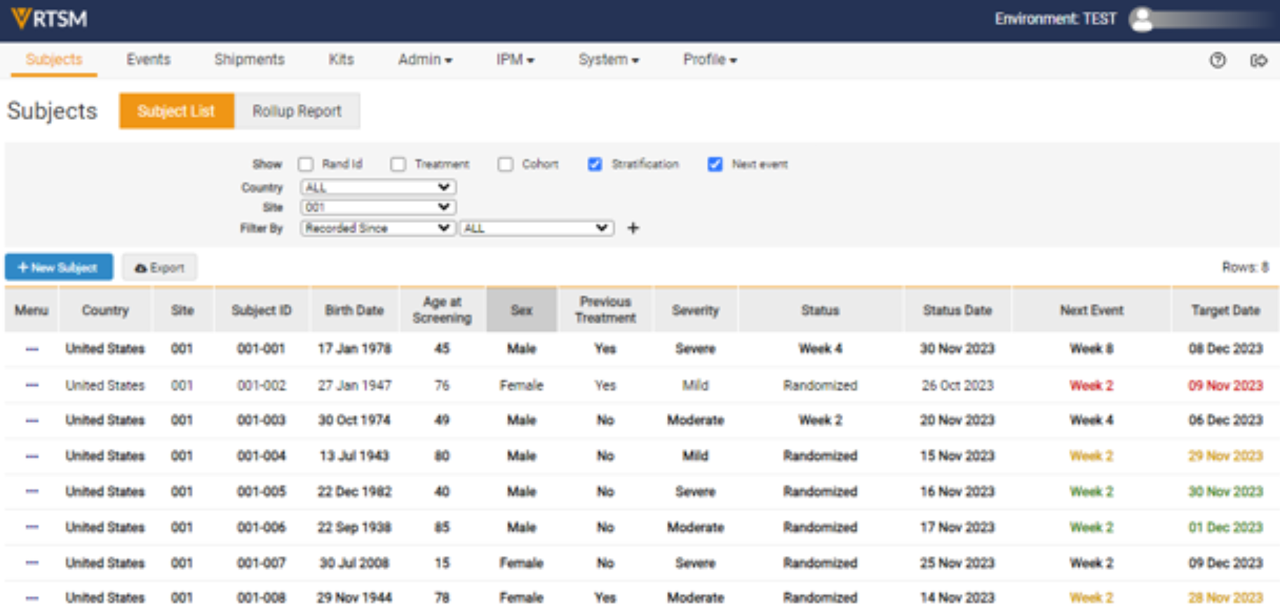
Note: Your study may have different tabs than displayed above.


